
Screenshots



Introduction
SocraDraft - AI Draft & Create is an innovative application developed by Woods2026, designed to transform the way individuals capture and develop their ideas. This app aims to eliminate the common pitfalls of scattered notes and half-formed thoughts that often lead to writer's block or incomplete projects. By utilizing advanced AI technology, SocraDraft provides a platform where users can freely express their thoughts without the constraints of structure or perfect language. The app takes your input—whether typed or spoken—and organizes it into a coherent draft, resulting in a polished, publish-ready piece of work. This makes it an ideal tool for knowledge workers, writers, podcasters, and students who think for a living.
Graphics & Gameplay
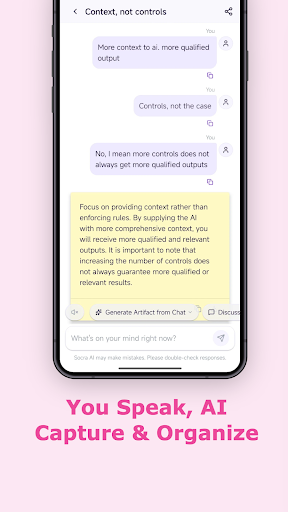
SocraDraft features a clean and user-friendly interface that emphasizes functionality while maintaining an aesthetically pleasing design. The screenshots depict a minimalistic layout with a focus on the text input area, allowing users to dive straight into their thoughts without distractions. The colors are soft and inviting, creating a comfortable workspace that encourages creativity. The app also showcases various formatting options, highlighting how users can switch from raw ideas to structured drafts seamlessly. The intuitive navigation ensures that even novice users can easily access all features without feeling overwhelmed. Overall, the graphics are both functional and appealing, supporting the app’s purpose of facilitating a smooth drafting process.
Key Features
- Freeform Input: Users can type, talk, or paste existing notes directly into the app, enabling a variety of ways to express thoughts.
- AI Notes & Draft Generation: The app automatically organizes input into clear, structured drafts in real-time, converting scattered thoughts into coherent ideas.
- Socratic AI Dialogue: Users can engage with an AI that challenges their reasoning and assumptions, which helps deepen their thinking and develop stronger arguments.
- Multi-format Creation: Whether it’s a memo, blog post, podcast script, or a custom format, SocraDraft allows users to specify their output needs.
- Conversational Editing: Users can refine their drafts using natural language, making the editing process feel intuitive and straightforward.
- End-to-End Drafting: From raw ideas to publish-ready work, the app supports the entire drafting process in a single session.
- Part of Socra Suite: SocraDraft is part of a broader suite of Socratic AI thinking tools, enhancing its capabilities and integration.
Mod Features
- Premium Unlocked: Access all premium features without any subscription fees, allowing users to make the most of the app's capabilities.
- No Ads: Enjoy an uninterrupted experience without advertisements, ensuring that users can focus solely on their thoughts and creativity.
- Unlimited Money: Users can unlock unlimited resources within the app, providing access to additional templates, themes, or advanced AI features.
- Enhanced AI Capabilities: Experience a more advanced version of the AI that offers deeper insights and more challenging questions to refine users' thinking.
- Custom Themes: Personalize the app’s appearance with various themes, making the workspace more engaging and tailored to individual preferences.
How to Install APK on Android
Installing SocraDraft on your Android device is a straightforward process. Follow these steps to get started:
- Enable Unknown Sources: Go to your device’s settings, navigate to 'Security', and enable 'Install from Unknown Sources' to allow installations from sources outside the Google Play Store.
- Download the APK: Click on the provided download link to download the SocraDraft APK file to your device.
- Locate the APK: Open your file manager and navigate to the folder where the APK was downloaded (usually the 'Downloads' folder).
- Install the APK: Tap on the SocraDraft APK file and follow the on-screen prompts to install the app.
- Launch the App: Once installed, find the SocraDraft icon in your app drawer and tap to open it. You are now ready to start drafting your ideas!
Conclusion
SocraDraft - AI Draft & Create is an essential tool for anyone looking to enhance their writing and idea-development process. With its unique blend of AI support and user-friendly design, this app empowers users to transform their scattered thoughts into polished, publish-ready content. Whether you are a professional, student, or creative, SocraDraft caters to a wide range of needs and can elevate your writing experience. Don't let your ideas go to waste—download SocraDraft today and take the first step towards capturing and refining your thoughts like never before!
Ready to take control of your ideas? Click here to download SocraDraft now!